2015年11月4日 星期三

iRemocon是open source 的(語音辨識)語音家電控制 小盒子,由日本人 後藤功創立,目前完成 ios , android windows...各平台的介面,也可以 通過各種通訊與網路來控制家電,也可提供溫度濕度,感測天氣的資料 初音 Speech control tv

iRemocon
iRemocon是open source 的(語音辨識)語音家電控制 小盒子,由日本人 後藤功創立,目前完成 ios , android windows...各平台的介面,也可以 通過各種通訊與網路來控制家電,也可提供溫度濕度,感測天氣的資料
http://futurismo.biz/archives/136

JuliusとiRemoconを組み合わせて、部屋の音声認識システムをつくった。
出来栄えは、こんな感じ。
http://futurismo.biz/archives/154

MMDAgentとiRemoconを組み合わせてみたらなかなか良かったので、まとめてみる。
利用opensource MMDAgeny 初音 語音程式 與 iRemocon 控制家電的 教學
https://en.wikipedia.org/wiki/Pure_Data

一個用於語音的視覺化開發工具

Open-Source Large Vocabulary CSR Engine Julius

The Julius Speech recognition process Julius.exe which is used to recognize speech from a microphone, to convert it to text and to publish it in a shared memory.
(語音 說話 口語) 辨識 服務 同時平行處理兩件工作,一直不斷把麥克風的資料轉譯入 共享記憶體,接著將指令轉成“控制指令”
The SIGService Process Takeit.sig which reads recognized speech from shared memory and sends it to the controller.


https://en.wikipedia.org/wiki/Processing_(programming_language)

用於圖片照片演算法與處理的javascript或獨立語言

https://en.wikipedia.org/wiki/OpenFrameworks

c++開發的 工具包,processing之源


http://www.mem.com.tw/article_content.asp?sn=0701020656


支援多種傳輸媒介 ECHONET國際標準,日本主導的網路家電標準ECHONET
ECHONET CONSORTIUM - エコーネットコンソーシアム


http://www.echonet.gr.jp/english/https://my.murata.com/zh/web/solution/echonet-lite-design-kit

ECHONET 是一個 應用層的通訊協定,目標是描述電器與狀態通訊跟控制,內文XML為基礎
Lite版的適用於所有非智慧家電
http://www.ttc.or.jp/j/std/wg/home_network/introduce/

物聯網協定比較
http://www.digitaltrends.com/home/zigbee-vs-zwave-vs-insteon-home-automation-protocols-explained/

維基 自動化 通訊協定 列表
https://en.wikipedia.org/wiki/List_of_automation_protocols

開源機器人列表
https://en.wikipedia.org/wiki/Open-source_robotics

一個日本人做的簡單 電視 控制程式,需要硬體 紅外線傳輸
http://www.forest.impress.co.jp/article/2007/09/18/ddtc.html

PC-OP-RS1
http://buffalo.jp/products/catalog/item/p/pc-op-rs1/

PC用赤外線リモコン(PC-OP-RS1、Kuro-RS、他)
http://www.chikadon.com/Doc/IR.html

dibuixinstruments. A multi-touch printabñe controller (kinect + Openframeworks)
https://www.youtube.com/watch?v=79EpRwRLq4M

OpenCV Marker Detector v0.1
https://www.youtube.com/watch?v=oSq9V2b5AZ8


Manual for the MONET(1) speech synthesis
engine and parameter editor

http://pages.cpsc.ucalgary.ca/~hill/papers/monman/

MONET is a generalised speech synthesis database editor and manager, and synthesiser parameter generation engine, that forms part of the TextToSpeech Experimenter Kit--a tool designed for speech researchers. Those interested in speech synthesis, speech production, or speech perception research will find the tool provides precise access to the timing and nature of speech events that, put together, form spoken language. This tool also opens up the possibility of experiments and training programs related to speech pathology, speech therapy and the process of acquiring spoken language. Although designed with the richness needed to manage an articulatory synthesiser, it can equally well be used to manage the databases associated with other parametric synthesis methods.

IVONA Text-to-Speech HQ (FREE - ~250MB/voice)
Quality: 10  Meter: 8  Variance: 8  Playability: 7  Total: 33
Classic Text To Speech Engine ($2.99 - ~10-20MB/voice)
Quality: 7  Meter: 8  Variance: 7  Playability: 10  Total: 32
CereProc (~$1.60 - ~140-170MB/voice)
Quality: 9  Meter: 9  Variance: 8  Playability: N/A  Total: *26*
Loquendo TTS Susan (~$5.36 - ~42MB)
Quality: 7  Meter: 6  Variance: 10  Playability: 4  Total: 27
Google TTS (Free, limited availability)
Quality: 5  Meter: 6  Variance: 5  Playability: 6  Total: 22
SVOX Pico (Free, limited availability)
Quality: 5  Meter: 7  Variance: 5  Playability: 4  Total: 21
Samsung TTS (FREE on Samsung devices)
Quality: 6  Meter: 6  Variance: 5  Playability: 4  Total: 21
ESpeak (Not one of the top 7)
Quality: 2  Meter: 3  Variance: 1  Playability: N/A  Total: 6


強大 軟體 自動 測試 工具 SAFS framework open source 多平台 多語言 關鍵字驅動 獨立工具

http://safsdev.sourceforge.net/Default.htm

SAFS
Software Automation Framework Support

Updated 2015.08.25
Initially developed by Carl Nagle for SAS Institute
Evolves as Opensource with permission from SAS Institute

Visit our Software Automation Framwork Support SAFSDEV Project on GitHub.
Visit our Software Automation Framwork Support SAFSDEV Project on SourceForge.


http://www.ibm.com/developerworks/rational/library/09/plainlanguagetestscriptusingsasfwithrft/
Use plain language for test scripts by implementing SAFS with Rational Functional Tester
使用簡單語言來測試軟體,實作SAFS用於IBM® Rational® Functional Tester 功能測試

SAFS framework 特色是
是open source 
多平台
多語言
關鍵字驅動
獨立工具

現在假設你需要測試 一個 ClassicsJavaA
可想而知是個 Java ,你需要JVM (JRE)環境,這裡用1.5.10版

他另外也裝了 MS  Windows Script Host 5.6

安裝SAFS
Install SAFS
To install SAFS:

Go to the SourceForge Web site, and type SAFS in the Search window.
你可以去SourceForge下載相關工具
Click the SAFS page link, and select View all files.
進入頁面 到 選擇 看 全部檔案

Expand SAFSRelease2007.04.18, 
and download the SAFSRelease2007.04.18.ZIP file.
Extract the contents of the~~~~~ SAFSRelease2007.04.18.zip file.
下載 並解壓縮 SAFSRelease2007.04.18.zip 

Double-click the SetupSAFS.wsf script file. SAFS and STAF are installed in these default locations:
執行SetupSAFS.wsf (是 MS  Windows Script Host 批次檔 描述)
會裝到下列路徑
c:\safs
c:\staf
如果想更新 你可以看看" SAFSOverlay \ SAFSOverlay_README.txt "
或是如上述法覆蓋


The SAFS directory structure Give the test project this directory structure:
SAFS 檔案結構如下 

Project_path\Datapool
Project_path\Datapool\Bench
Project_path\Datapool\Dif
Project_path\Datapool\Logs
Project_path\Datapool\Test

舉例你的專案叫   MyTests, SAFS目錄該這樣
For example, if Project_path is c:\MyTest, then the SAFS directory structure is as follows:
C:\MyTests\Datapool
C:\MyTests\Datapool\Bench
C:\MyTests\Datapool\Dif
C:\MyTests\Datapool\Logs
C:\MyTests\Datapool\Test
For additional information and custom installation details, see the SetupSAFS.Readme file that is listed in the Resources section.新增訊息與自訂請看 SetupSAFS.Readme 


Configuring Rational Functional Tester
設置專案去

1. Enable the Java environment in Rational Functional Tester.

2. Run the C:\SAFS\SetupRationalClasspath.WSF script to locate and add IBM Rational JAR files to the CLASSPATH.
在JVM裡要執行當然要在config 寫入java的路徑資訊CLASSPATH
請 執行 C:\SAFS\SetupRationalClasspath.WSF

Important:
Do not name any Rational Functional Tester scripts, "TestScript," because SAFS uses this name. Also make sure that there are no files named:
注意檔名不要與環境檔案衝突

TestScript.java
TestScript.class
TestScriptHelper.class

接著 細節 c:\safs\safstid.ini
[SAFS_LOGS]
AUTOLAUNCH=TRUE
是否預設執行
OVERWRITE=TRUE
是否覆蓋紀錄
CAPXML=TRUE
XML支援

c:\safs\Project\tidtest.ini 
[SAFS_PROJECT]
ProjectRoot="C:\safs\project"
專案名
[SAFS_TEST]
TestName="TIDTest"
測試民
TestLevel="Cycle"
CycleSeparator=","
CycleLogName="TIDTest.SAFS"
紀錄檔名
CycleLogMode="TEXTLOG XMLLOG"
millisBetweenRecords= 0

執行設置 ,執行 runTIDTest.bat , 
java –Dsafs.project.config="c:\safs\project\TIDTEST.ini" org.safs.tools.drivers.SAFSDRIVER pause


Tip: 請確認你的路徑,請停止SAFS 的所有服務與執行工作

If there is an error when the batch file runs, the command prompt displays the error message until you press a key. Without the pause command, the error message is not displayed with sufficient reading time.

Run the runTIDTest.bat file located in C:\safs\Project. 執行批次檔的地方

After the runTIDTest.bat file runs a log named TIDTest.SAFS.txt is generated in C:\safs\Project\Datapool\Logs. The log file contains this message: 
OK TIDTest Services all present and working.


C:\SAFS\Project \ RFTTest.ini 
Edit runRFTTest.bat file, which is the C:\SAFS\Project folder, adding a pause command: 
java –Dsafs.project.config="C:\safs\project\RFTTest.ini" org.safs.tools.drivers.SAFDRIVER pause


確認有 C:\safs\Project\Datapool\Logs \ RFTTest.txt
讀讀 SetupRFT.Readme  

呼 終於完成 configure

 接下來 看看 有哪些 元件

 執行
runTIDTest.bat 
runRFTTest.bat
會有
在 C:\MyTests\Datapool
Cycle table (.CDD file) 循環,記錄完成的大事件
Suite table (.STD file) 確認,Step的大事記
Step table (.SDD file) 步驟,記錄低階 io 與檔案處理
Map file 是RTTI或記憶體內容
四個檔案 
(不過你不用一一自己看,下面有工具)


java 處理緒內容 資訊
The STAF Process Container window
To get the details for the map:

Start the STAF server 在開始功能表,程式集 STAF- Software Testing Automation Framework.
啟動STAF server 
Click Start STAF, and then minimize the command prompt that opens.
會有常駐圖示

執行批次檔   C:\safs\Project \ STAFProcessContainer.bat
  
開啟執行 STAF Process Container window 


本文 省略一些 註解 請看原文


Test Automation Frameworks


REFERENCES:
How Do I...?


2015年11月3日 星期二

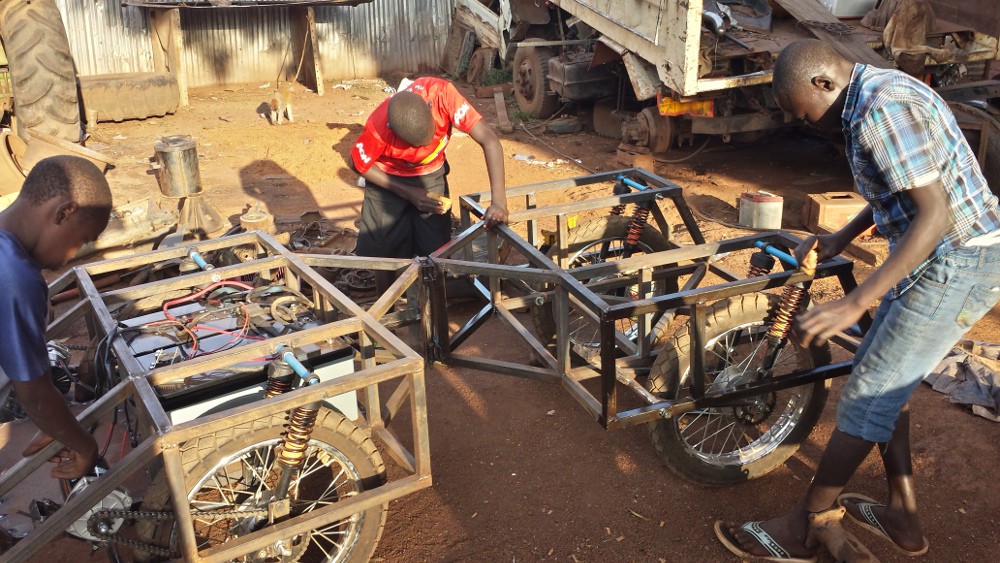
蘇丹 低成本 特施拉 太陽能 電車 四輪驅動 suv Light Electric Utility Vehicle

https://hackaday.io/project/4997/logs

蘇丹 低成本 特施拉 太陽能 電車 Light Electric Utility Vehicle

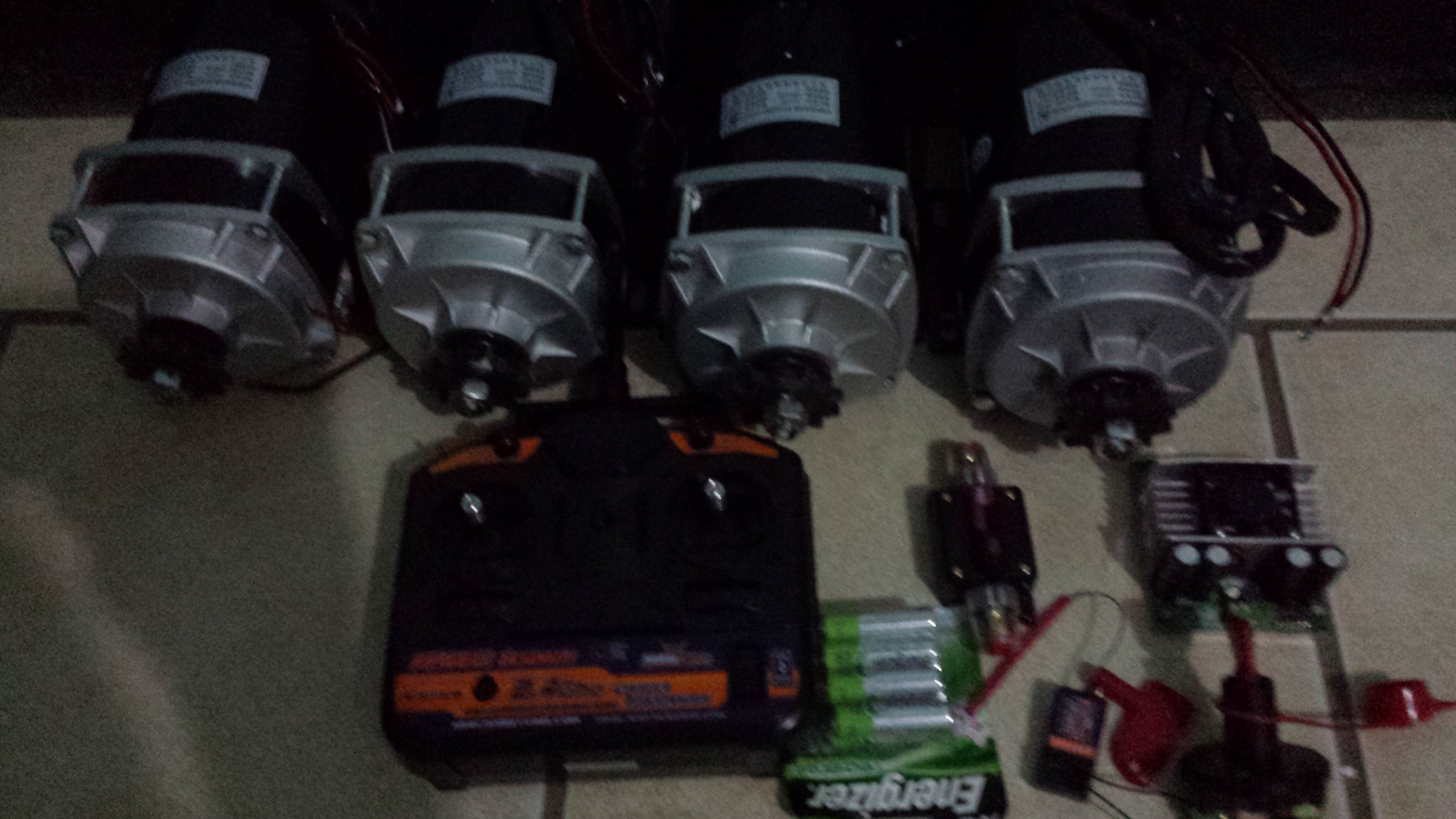
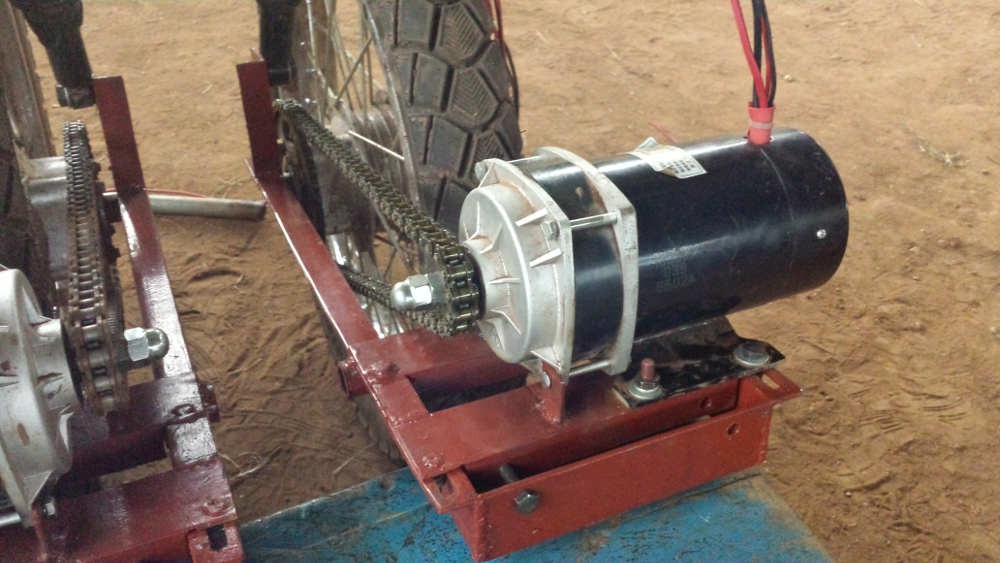
 Chinese Unite MY1122ZXF 650W 24V DC brush geared motors 
系統採用四顆中國製24V 直流電刷馬達 跟簡單電源控制電路 和 玩具遙控器

看起來都是 made in china
值得一提的是:他是利用“遙控汽車”的控制器,發送訊號給arduino 控制
雙車體,聯結式
四輪獨立模組


裝設400~600瓦太陽能面板

兩個電池

~~~~~~~~arduino pro 控制電路


2015年11月2日 星期一

兩個 機械 結構 教學 教育 網站

http://www.robives.com/mechs
兒童 機械 結構 教學 教育 網站,robives

https://www.youtube.com/user/robives
robives  youtube頻道

這是些底圖
http://www.robives.com/patterns

你可以在這裡找到一些下載的 紙模型
http://www.robives.com/blogshop
https://www.patreon.com/robives?ty=h

某些內容是需要會員付費的


木工教學網站,還有需多 機械 與 木工工具DIY 教學
http://woodgears.ca/index.html


http://woodgears.ca/gear/wear.html相當詳細的教學內文


裡面有一個 藍芽 相片印表機跟一個 arduino ,連接USB去電腦,Processing.javascript 會去查詢 Instagram , 當你選擇 地點後 按列印 ( apple script ) 他會輸出一個 相片 圖

http://www.andrewhaskin.com/Arduino-Processing-Globalgram-Prototype

Andrew Haskin

Globalgram
Programming for Interaction, Fall 2011

Here is my final project for my Programming class. It’s a prototype of my original concept, which you can read about here. To operate, you would select a nature-inspired theme via the selector dial on the right, and then push the ‘Print’ button to print the latest post to Instagram based on your selection.
這是我為我的編程類決賽的項目。這是我原來的概念,你可以這裡讀的原型。操作時,你會選擇通過右側的選擇旋鈕一個自然靈感的主題,然後按「打印「按鈕,打印最新的崗位Instagram的根據您的選擇。

Inside, you’ll find an Arduino, a rotary switch, a button, and wireless Polaroid ZINK printer. The Arduino is powered by the USB cable that connects to it, and feeds the signal of the button and switch to a computer. The computer then uses Processing to query Instagram for a search based on with you selected using the dial. When someone pushes the ‘Print’ button, Processing saves the image to a folder, which uses an Apple script (thanks Brendan Dawes) to send the file wirelessly via Bluetooth to the printer, and that’s it!

裡面有一個 藍芽 相片印表機跟一個 arduino  ,連接USB去電腦,Processing.javascript 會去查詢 Instagram , 當你選擇 地點後 按列印 ( apple script ) 他會輸出一個 相片 圖

The concept was inspired by Instaprint.


delphi 日文網站

http://mrxray.on.coocan.jp/index.htm

http://www2.big.or.jp/~osamu/Delphi/Tips/key.cgi?key=25

http://d.hatena.ne.jp/nomnel/20111125/1322183069

http://www.geocities.jp/asumaroyuumaro/program/tips/gdiplus.html

http://dobon.net/vb/dotnet/graphics/transform.html

delphi 請問Timer如果不用拉元件產生的,該如何寫

type
  TDBThread = class(TThread)
  protected
    procedure PrintMsg;
    procedure Execute; override;
  end;
procedure TDBThread.Execute;
begin
  while Not Terminated do
  begin
    Synchronize(PrintMsg);
    Sleep(1500);
  end;
end;
procedure TDBThread.PrintMsg;
begin
  Form1.Memo1.Lines.Add(TimeToStr(Time) + ': Threading');
end;
procedure TForm1.FormShow(Sender: TObject);
begin
  DBThread := TDBThread.Create(False);
end;
procedure TForm1.FormClose(Sender: TObject; var Action: TCloseAction);
begin
  DBThread.Terminate;
  DBThread.WaitFor;
  DBThread.Free;
end;
攪個直執行緒Sleep(1500);就是你要它多久做一次(準一點 )

delphi runtime 取得panel下的可視元件 savetofile

delphi runtime 取得panel下的可視元件

procedure TForm1.AddToTreeView(ATreeNode: TTreeNode; APanel: TPanel);
var
  i: integer;
  TmpTreeNode: TTreeNode;
begin
  for i := 0 to APanel.ControlCount - 1 do
  begin
    TmpTreeNode := TreeView1.Items.AddChild(ATreeNode, APanel.Controls[i].Name);
    if APanel.Controls[i] is TPanel then
     AddToTreeView(TmpTreeNode, TPanel(APanel.Controls[i]))
  end;
end;

procedure TForm1.Button1Click(Sender: TObject);
var
  i: integer;
  tn, TmpTreeNode: TTreeNode;
begin
  tn := TreeView1.Items.Add(nil, Panel1.Caption);
  for i := 0 to Panel1.ControlCount - 1 do
  begin
    TmpTreeNode := TreeView1.Items.AddChild(tn, Panel1.Controls[i].Name);
    if Panel1.Controls[i] is TPanel then
    begin
     AddToTreeView(TmpTreeNode, TPanel(Panel1.Controls[i]))
    end;
  end;
end; 


function MethodPropToStr: string;
  var
    Value: TMethod;
    Root: TComponent;
  begin
    Value := GetMethodProp(Instance, PropInfo);
    if Value.Code <> nil then
    begin
     if Instance is TForm then
     Root := TComponent(Instance)
     else
     Root := TComponent(Instance).Owner;
     Result := Root.MethodName(Value.Code);
    end else begin
     Result := '';
    end;
  end;

begin
  begin
    PropType := PropInfo^.PropType^;
    case PropType^.Kind of
     tkInteger, tkChar, tkEnumeration, tkSet:
     Result := OrdPropToStr;
     tkFloat:
     Result := FloatPropToStr;
     tkString,tkLString:
     Result := StrPropToStr;
     tkClass:
     Result := ClassPropToStr;
     tkMethod:
     Result := MethodPropToStr;
     else
     Result := 'Unknown';
    end;
  end;
end;

{TObjInfo}
constructor TObjInfo.Create(Instance: TObject);
begin
  HaveInstance:= False;
  if Assigned(Instance) then
  begin
    FInstance:= Instance;
    FName:= Instance.ClassName;
    ListUpProps(Instance);
  end;
end;

destructor TObjInfo.Destroy;
begin
  if HaveInstance then
    FreeMem(FPropList, PropCount * SizeOf(Pointer));

  inherited Destroy;
end;

function TObjInfo.GetItems(Index:Integer):TMyPropInfo;
var
  PropInfo: PPropInfo;
  PropType: PTypeInfo;
  PropName, PropValue: string;
begin
  PropInfo := FPropList^[Index];
  if PropInfo = nil then
  begin
    Raise Exception.Create('Invalid Index');
    Exit;
  end;
  PropName := PropInfo^.Name;
  Result.Name:= PropName;
  PropValue := PropValueToStr(TPersistent(FInstance),PropInfo);
  Result.Value:= PropValue;
  PropType := PropInfo^.PropType^;
  Result.Kind:= PropType^.Kind;
end;

function TObjInfo.IndexOfProp(const S:String):Integer;
var
  i:integer;
  St:TStringList;
begin
  St:=TStringList.Create;
  for i:= 0 to FCount -1 do
    St.Add(Self[i].Name);

  Result:= St.IndexOf(S);
  St.Free;
end;

procedure TObjInfo.ListUpProps(Instance:TObject);
begin
  FCount := GetTypeData(Instance.ClassInfo)^.PropCount;
  if FCount > 0 then
  begin
    GetMem(FPropList, FCount * SizeOf(Pointer));
    HaveInstance:= True;
    try
     GetPropInfos(Instance.ClassInfo, FPropList);
    except
    end;
  end;
end;

end.

unit DsnInfo;

// Runtime Design System Version 2.x June/08/1998
// Copyright(c) 1998 Kazuhiro Sasaki.

interface

uses
  Windows, Messages, SysUtils, Classes, Forms, Controls, Dialogs,
  TypInfo;

type

  TMyPropInfo = record
    Name:String;
    Value:String;
    Kind: TTypeKind;
  end;

  TObjInfo = class
  private
    FInstance:TObject;
    FName: String;
    FCount:Integer;
    FPropList: PPropList;
    HaveInstance:Boolean;
    procedure ListUpProps(Instance:TObject);
    function GetItems(Index:Integer):TMyPropInfo;
  public
    constructor Create(Instance: TObject);
    destructor Destroy; override;
    function IndexOfProp(const S:String):Integer;
    property Name:String read FName;
    property Items[Index:Integer]: TMyPropInfo read GetItems; default;
    property PropCount: Integer read FCount;
  end;

  function PropValueToStr(Instance: TPersistent;
     PropInfo: PPropInfo):string;

implementation

type
  TIntegerSet = set of 0..SizeOf(Integer) * 8 - 1;

function PropValueToStr(Instance: TPersistent;
     PropInfo: PPropInfo):string;
var
  PropType: PTypeInfo;

  function SetPropToStr(Value: Cardinal):string;
  var
    I: Integer;
    BaseType: PTypeInfo;
  begin
    BaseType := GetTypeData(PropType)^.CompType^;
    Result := '[';
    for I := 0 to 15 do
     if I in TIntegerSet(Value) then begin
     if Result <> '[' then
     Result := Result + ',';
     Result := Result + GetEnumName(BaseType, I);
     end;
    Result := Result + ']';
  end;

  function OrdPropToStr:string;
  var
    Value: Longint;
  begin
    Value := GetOrdProp(Instance, PropInfo);
    case PropType^.Kind of
     tkInteger:
     Result := IntToStr(Value);
     tkChar:
     Result := Chr(Value);
     tkSet:
     Result := SetPropToStr(Value);
     tkEnumeration:
     Result := GetEnumName(PropType, Value);
    end;
  end;

  function FloatPropToStr:string;
  var
    Value: Extended;
  begin
    Value := GetFloatProp(Instance, PropInfo);
    Result := FloatToStr(Value);
  end;

  function StrPropToStr:string;
  begin
    Result := GetStrProp(Instance, PropInfo);
  end;

  function ClassPropToStr:string;
  var
    Component: TComponent;
  begin
    if GetTypeData(PropInfo^.PropType^)^.ClassType.InheritsFrom(TComponent)
    then begin
     Component := TComponent(GetOrdProp(Instance, PropInfo));
     if Component = nil then
     Result := ''
     else
     Result := Component.Name;
    end else begin
     FmtStr(Result, '(%s)', [PropInfo^.PropType^.Name]);
    end;
  end;


必須引用一個別人寫的物件
只有以下是我寫的
//******************************************************************************
procedure TForm1.Button2Click(Sender: TObject);
//*********************************************
function objins(Sender: TObject):TStringList;
const
KindTYPE : array [0..17] of string =('Unknown','Integer', 'Char', 'Enumeration',
    'Float', 'String' , 'Set', 'Class', 'Method', 'WChar', 'LString', 'WString',
    'Variant','Array', 'Record', 'Interface', 'Int64', 'DynArray');
var
 AObjInfo : TObjInfo;
 i :Integer;
 S :String;
 STR :TStringList;
begin
AObjInfo := TObjInfo.Create(sender);
  STR:= TStringList.Create;
  //STR.Add('Object'+' '+AObjInfo.Name);
  //STR.Add(' '+'begin');
  for i := 0 to AObjInfo.PropCount-1 do begin
    S:=' ';
    if AObjInfo.Items[i].Value <> '' then begin //如果是空資料就不顯示
     S:=S+''+ AObjInfo.Items[0].Value;
     S:=S+'_'+ KindTYPE[Ord(AObjInfo.Items[i].Kind)];
     S:=S+'_'+ AObjInfo.Items[i].Name +' = '+ AObjInfo.Items[i].Value;
     S:=S+';';
     //+' , '+ IntToStr(Ord(AObjInfo.Items[i].Kind))
     STR.Add(S);
    end;
  end;
  //STR.Add(' '+'end');
  Result := STR ;
end;
//*********************************************
begin
  Memo1.Lines.Text :=objins(Sender).Text;
end;
//******************************************************************************

procedure TForm1.Button1Click(Sender: TObject);
//*********************************************
procedure AddToTreeView(ATreeNode : TTreeNode ; APanel: TPanel);
var
  i: integer;
  TmpTreeNode: TTreeNode;
begin
  for i := 0 to APanel.ControlCount - 1 do
  begin
    TmpTreeNode := TreeView1.Items.AddChildObject(ATreeNode, APanel.Controls[i].Name,APanel.Controls[i]);
    //TmpTreeNode := TreeView1.Items.AddChild(ATreeNode, APanel.Controls[i].Name);
    if APanel.Controls[i] is TCustomControl then
     AddToTreeView(TmpTreeNode, TPanel(APanel.Controls[i]))
  end;
end;
//*********************************************
var
  i: integer;
  tn, TmpTreeNode: TTreeNode;
begin
  tn := TreeView1.Items.Add(nil, Panel1.Caption);
  for i := 0 to Panel1.ControlCount - 1 do
  begin
    TmpTreeNode := TreeView1.Items.AddChildObject(tn, Panel1.Controls[i].Name ,Panel1.Controls[i]);
    if Panel1.Controls[i] is TPanel then
    begin
     AddToTreeView(TmpTreeNode, TPanel(Panel1.Controls[i]))
    end;
  end;
end;
//******************************************************************************
procedure TForm1.TreeView1DblClick(Sender: TObject);
begin
  Button2Click(TObject(TreeView1.Selected.Data));
end;

Resizing Controls at run time

delphi runtime design library
delphi runtime library

MFC
CRectTracker
Resizing Controls at run time
http://www.codeproject.com/Articles/7771/Limit-CRectTracker-handles
http://www.codeproject.com/Articles/856/Resizing-Controls-at-run-time


TStretchHandle
http://www.torry.net/quicksearchd.php?String=tstretchhandle&Title=Yes
http://delphimaster.net/view/4-1125138258/all

http://neftali.clubdelphi.com/?p=269

The Runtime Design System Suite By Kazuhiro Sasaki.
Runtime Design System v.2.2 FWS 1051 Kb 27 May 1999
By Kazuhiro Sasaki. At runtime, your application users can do Moving Controls, Resizeing Controls, Deleting Controls, Creating Controls, Changing Property in the Object Inspector, Saving Controls and Loading Controls if you use the Runtime Design System. Moreover, you hardly need to do programming.
Fully functional
Source: Included
Exe-demo included
Download: D3 D4


Runtime Designer Component. called TSelectOnRuntime of Neftali (ClubDelphi.com) works on Lazarus


Using Delphi and Python together
Talk for the Australian Delphi User Group (ADUG), July and August 2001
-Andy Bulka
abulka@netspace.net.au

A simple Python evaluator:

Create a new Form
Drop a TMemo (or a TRichEdit)
Drop a TPythonGUIInputOutput 
for displaying Python's messages
Drop a TMemo for the source code
Drop a TPythonEngine
Connect the attribute IO of the 
TPythonEngine to the 
TPythonGUIInputOutput.
Connect the attribute Output of 
TPythonGUIInputOutput to 
the TRichEdit.
Drop a TButton and 
call it "Execute script"
Double-click on the button and add:

delphi 如何實現動態物件

delphi 如何實現動態物件  


有什方法可以在不知到物件數目的情況下
在執行時期動態產生物件
就像是ValArray一樣可以變大變小

1.宣告動態陣列, 例: edt: array of TEdit; 
2.設定動態陣列的長度, 例: SetLength(edt, 10);
3.動態 create 元件, 例:
var
  i: integer;
  
begin
  for i := 0 to 9 do
  begin
    edt[i] := TEdit.Create;
    edt[i].Parent := Form1;
    edt[i].Left := ...;
    edt[i].Top := ...;
  end;
end;
  
SetLength(edt, 10); 

它適合""非物件""的動態ㄝ
我看它的原始碼是利用記憶體抓取的方法
我有查到有一種物件TObjectList不知到這個行不行
或是更上層的Tlist也市不錯用的
  
 
我想會出現記憶體錯誤的情形在於重設陣列大小之前
還必須手動將不要用的 TEdit Free 掉
  
TObjectList 也是個很好的選擇!
  
就是要如何釋放掉ㄋ
用TEdit[i].free OR TEdit[i].Destroy
OR SetLength(TEdit,0) OR freeMem(@TEdit) OR......
前三種都是過嚕會出現"無效指標"

edt[i].Free;
edt[i] := nil;

FreeAndNil(edt[i]);

delphi 由滑鼠座標取得所在座標的字元位置

delphi 由滑鼠座標取得所在座標的字元位置 
1)
richedit 
由滑鼠座標取得所在座標的字元位置
(為了讓richedit在被dorpdrag時達到拖曳到插入貼上)

2)
richedit 不行輸入TAB怎辦

>1)
>richedit 
>由滑鼠座標取得所在座標的字元位置
>(為了讓richedit在被dorpdrag時達到拖曳到插入貼上)
 
 TRichEdit.GetCaretPos 函式可達到
 
>2)
>richedit 不行輸入TAB怎辦
 

 RichEdit1.WantTab := True;