顯示具有 web editor 標籤的文章。 顯示所有文章

2015年10月8日 星期四

Vim Vi 超級老牌 的 編輯器


https://en.wikipedia.org/wiki/Vim_(text_editor)

http://www.vim.org

萬能但超難

Vim 編輯器是一個模仿在Unix上的Vi (Vi IMporved (Bill Joy))編輯器,由 Bram Moolenaar 為基礎開發的Stevie editor 在 Amiga系統,於1991年發表,Vim使用者介面由Command in interface (命令列介面為主)

目前軟體授權為 GNU General Public License.


1992年1.22版本的Vim被移植到了UNIX和MS-DOS上,Vim經過多年的社群開發已經增加許多功能了,最新的版本是Vim4

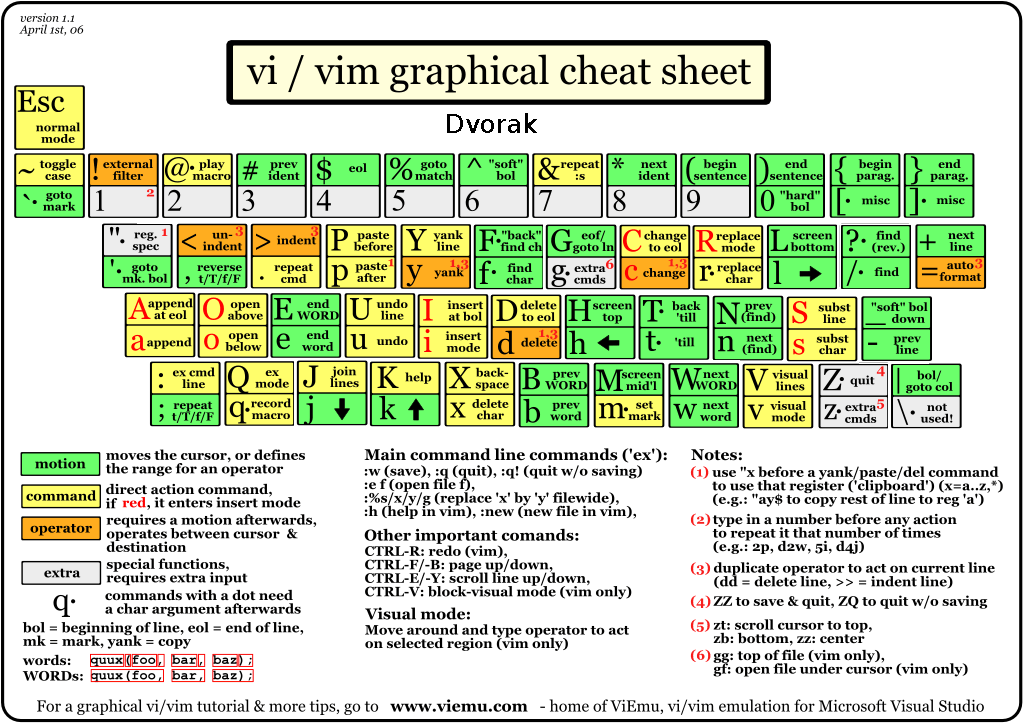
關於困難度:Vim的操作與學習應該算是逆趨勢的越更新越難,聞名的是沒有功能表,四種模式加上無限多酷炫的快速鍵功能,超弱的使用者介面,卻超受自認為是駭客等級的開發者喜愛

使用時建議下載這種東西貼在旁邊


2015年10月6日 星期二

SynWrite 相當完整的免費網頁文字編輯工具

SynWrite
A free text and source code editor
免費網頁文字編輯工具
http://www.uvviewsoft.com/synwrite/
http://www.uvviewsoft.com


SynWrite 結合許多很棒的點子在一起,是一個完整且成熟的網頁編輯環境

的很多功能包括巨集紀錄,碼的語法凸顯,語法的收放折疊,多游標編輯

你可以簡單的編輯 插件 ,插件使用Python 描述


You can easily configure it to your needs and even take it with you on a USB flash drive. It's free, open-source software.
你可以輕易的設定你需要的,他可以放在USB 磁碟裡,他是免費的,開放原始碼 軟體

功能 :


SynWrite features

Fully customizable syntax highlighting for many languages 
有許多語法的支援,全部自訂語法凸顯

Code folding語法的收放折疊
Supports almost all encoding systems (ASCII, Unicode, etc.)多種內碼支援
Multiple-caret editing (see animation)多游標編輯

Multiple selections (see animation)多選定編輯

Panels:面板
Tree view for source code從樹狀表看原始碼
File manager檔案管理
Project management專案管理
FTP/SFTP client FTP用戶端
Document mini-map 文件地圖
Clipboard history 剪貼簿 歷史
External tools output 外在工具
Search results 搜尋
Text clips 文字暫存
Tabs list 標籤列
Coding helpers: 編輯求助
Auto-completion (for few lexers, see help topic) 自動完成
Auto-closing of tags/brackets 
Code templates 程式碼模板
SmartTagTabbing feature (see animation)

SyncEditing feature to edit identical identifiers (see animation)

Emmet (Zen Coding) support (HTML + CSS + XSL high speed coding engine)
Color preview
Color picker
Image preview
Insert image tags
Insert date/time stamps
Portable bookmarks 書籤
Column markers 整行選取
Micro-map
Search and replace with regular expressions
Search and replace in multiple files 可以搜尋多檔案或是單一檔案內
Use external tools (capture console output, navigation to error lines)
Use Python-based plugins
Use binary plugins (e.g. Explorer panel and FTP client are plugins)
Regex-based strings extraction
Customizable hotkeys
Bookmarks
Key macros
Spell checker 拼音確認
File sessions 檔案暫存
Plugin for "Total Commander" file manager


Multilingual interface: German, French, Russian, Spanish, Italian, Japanese, Chinese, etc.
Integrated HTML Tidy library
Export to RTF/HTML with syntax highlighting
Portable mode
...and more!




EmEditor 快速,輕巧,可擴展,使用方便的 Windows 文字編輯器


EmEditor 是快速,輕巧,可擴展,使用方便的 Windows 文字編輯器。同時支持32位元和64位元建置!

值得一推的工具 強大且快

台灣官網

ZDnet.com 的 Ed Burnette 稱 EmEditor 為 “全球最快的文字編輯器”。 (見全文)


EmEditor 文字編輯器支持功能強大的巨集,萬國碼,和超大檔案。Emurasoft 公司致力于隨時傾聽并滿足客戶的需求。我們提供及時的客戶服務, 并希望通過不斷地技術更新來更好地服務于客戶。我們的客戶包括:大型企業,教育機構,歐盟組織,日本及其他各國的政府部門。


EmEditor 已獲得超過24個國際獎項,包括在最佳應用程式類別中榮獲共享軟件企業獎。EmEditor 還獲得了微軟 Windows 8 的授權認可。

EmEditor 的標籤式視窗設計讓文檔之間的轉換更加迅速,并且能讓您的視窗井然有序。
EmEditor 使用標籤式視窗,與Chrome, Firefox 以及其他標籤式瀏覽器相似。您可以在一個視窗中打開多個文檔,隨時在這些文檔中轉換。例如,您可以拖放標籤圖示來變換文檔順序,或者,您也可以把游標移到標籤上后按一下滑鼠的中間按鈕來關閉此標籤。另外,您還可以在“視窗"下拉式功能表中選擇“啟用標籤"命令,這樣的話,您就可以方便地在標籤式介面與單一文檔介面中轉換。當您選擇這個命令時,EmEditor 會自動把多個視窗合并成一個多標籤視窗,所有的標籤都會顯示在視窗的上方。當您再次點擊來取消這個命令后,EmEditor 會把您當前所有的標籤轉換為多個視窗。

標籤式視窗功能包括一個內容功能表。在標籤上單擊滑鼠右鍵來顯示內容功能表(也可稱為“右鍵功能表”)。內容功能表中有幾個指令非常有用。比如,“新增群組”指令讓您可以把當前標籤視窗獨立作為一個視窗;當然,您也可以通過把一個標籤視窗用滑鼠拖放到 EmEditor 編輯器外來創建另一個新視窗。此外,您不僅可以在內容功能表上規定標籤排列的方式,還可以選擇“自訂標籤”選項來制定或調整適合自己使用的標籤顯示方式,比如,標籤視窗的排列方式,圖示類型以及關閉后的狀態。內容功能表節省了您去"工具"下拉式功能表中選擇“自訂”對話方塊,按"標籤"頁進行自訂標籤設置的繁複步驟。


ConTEXT Notepad Editor 穩定好用的免費工具

ConTEXT Notepad Editor

New BSD License

歷史悠久且支援多國語言


 C#, C/C++, Delphi/Pascal, Java, JavaScript, Visual Basic, Perl/CGI, HTML, CSS, SQL, FoxPro, 80×86 assembler, Python, PHP, Tcl/Tk XML, Fortran, Foxpro, InnoSetup scripts.  

是 一個 穩定 好用的 Windows 編輯器 免費 工具

搜索和替換

正則表達式

漸進式搜索

文本強調

強大的命令行處理程序

Unicode的UTF-8

support capturing console applications standard output
支援 對 編譯程式的 DOS Console 標準輸出 的 捕捉 


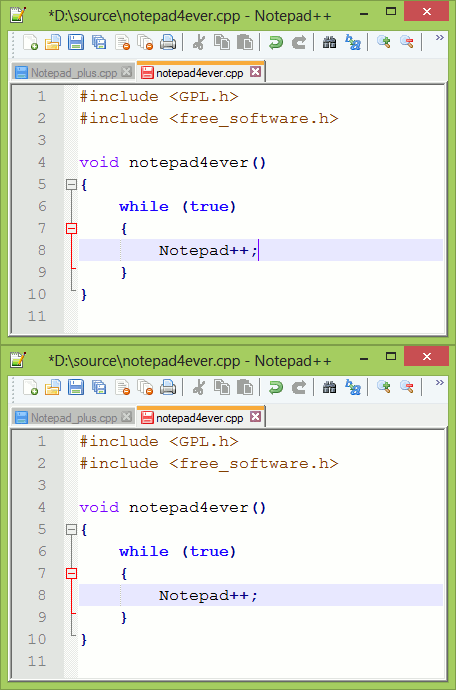
Notepad++ 多功能文字編輯器

Notepad++
Notepad++ 是一個 取代 “ 記事本 ” 的好工具 
他 是 一個 開放原始碼 並且 支援 很多 網路 程式語言 的 文字編輯器
 It’s an open source code editor with a support of lots of several web languages.
可以在 Windows 視窗環境下執行

The Syntax Folding and Highlighting
語法凸顯 當然 是 一定有的
Search Regex Functionality, Search and Replace
搜尋功能 或是 搜尋並且取代 也有
Auto-suggestions: Word, Function and  parameters suggestions
自動建議 (在 編輯時 會 自動 提出 語法建議)
Tab interface much like Google Chrome
標籤頁類似 google chrome 瀏覽器
WYSIWYG (Printing)
所見即所得的列印
Zoom in and zoom out
放大所小
Multi-Language environment supported
多種語言的支援
Bookmark
Macro recording and playback
巨集錄製

語法上目前可以解讀如下
C++, PHP, HTML, CSS, JavaScript, Ada, asp, audit, C#, Haskell, 
Objective-C, Pascal, Perl, PostScript, Powershell, Python, Ruby,
 Shell, Scheme, Smalltalk, SQL, XHTML, XML.


2015年10月3日 星期六

jEdit 老牌 跨平台 編輯器


jEdit 已經是成熟的 程式 文字編輯 工具 與 擁有 豐富的 插件 
版權文件為 GPL 2.0.
 特色:
由java開發,所以通行於 Mac OS X, OS/2, Unix, VMS, Windows.
Built-in macro language; extensible plugin architecture. Hundreds of macros and plugins available.
內建巨集語言可擴展的插件架構。數以百計的巨集和插件可供選擇。更有巨集管理

Auto indent, and syntax highlighting for more than 200 languages.
自動縮排 與 語法凸顯,有超過200種語言
Supports a large number of character encodings including UTF8 and Unicode.
Folding for selectively hiding regions of text. 文字段落收折
Word wrap. 單字斷行
Highly configurable and customizable.

Every other feature, both basic and advanced, you would expect to find in a text editor. See the Features page for a full list.
高度可配置和可定制的。
的其它功能,基本和高級,你會期望找到一個文本編輯器。參見功能頁面的完整列表。


Aptana Studio 3 Ruby javascript 編輯工具

http://www.aptana.com/index.html

http://www.aptana.com/products/studio3.html


Aptana Studio 3  核心來自繼承 Aptana Studio 2  ,讓你檢視、編輯、除錯 HTML, CSS 和 JavaScript 網站 , 包含 PHP 和 Ruby on Rails web development.

開放原始碼
https://github.com/aptana/studio3/wiki/Release-Notes

 當然 它支援 大部份的網頁語言 甚至HTML5 ,多種方式的上傳工具

值得一提的是 Ruby Rails  和 javascript 的除錯功能與 terminal 命令列

 使用java javascript 開發完成,加入Titanium Studio (PhoneGap like)核心


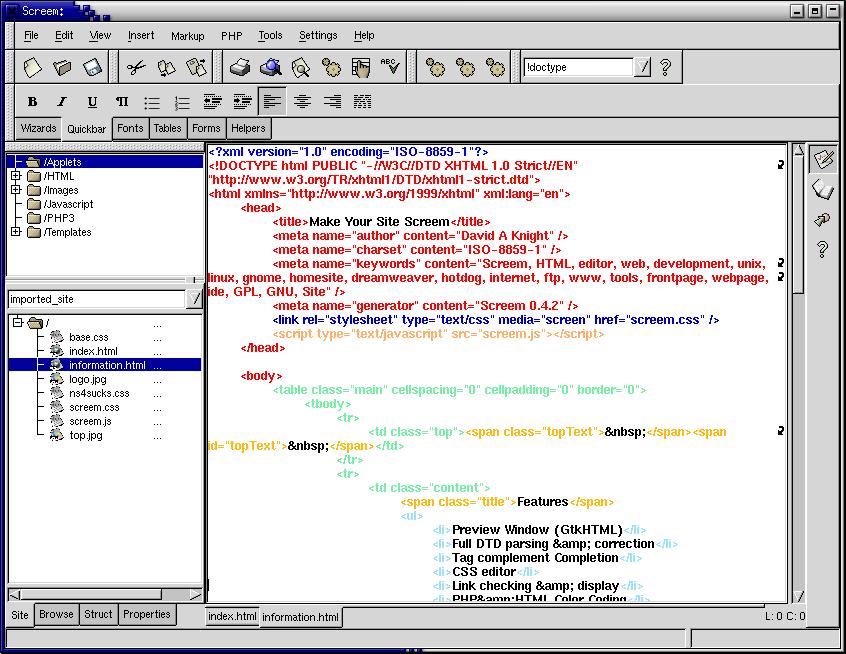
Screem HTML XML Editor


http://www.screem.org/features.php

Screem HTML/XML Editor 


SCREEM is an open source HTML/XML editor for unix based systems, and the GNOME desktop environment.

是針對 unix 為基礎系統 的 開放原始碼 的 網頁文字 編輯器 並且 以 GNOME 為 桌面環境

特點如下
(還沒全部實作)

Broken Link Checking
超連結確認 
A "link view" is provided which shows all the links in the current page, and links in those pages, to a user definable depth. The link view also shows if a link is accessible or not, or if the file needs uploading if the upload wizard is being utilised for the site being worked on.
讓你 檢查 連結 檢視 結果, 讓擬定檢查深度, 確認每個連結是可取得的,如果檔案需要上傳將會有精靈可以設置

CTags Support
Support is also included for utilising ctag files. The symbols side bar will provide quick access to functions and the files they are in, as well as autocompletion support for symbols from documents of the same type as the one being worked on.

This requires that the ctags program is installed on your system and only works if the site isn't being edited on a remote server.
支援利用CTAG文件。符號邊欄將快速使用的功能,符號快速的功能和它們在文件,以及自動完成支持正在處理。
這就要求ctags的程序安裝在系統上,只有當該網站沒有被編輯的遠程服務器上的工作。

Cut / Paste
As well as supporting cutting / pasting of normal text SCREEM also understands other types of data on the clipboard. For instance you can copy from the GNOME web browser and have the html that was selected pasted, rather than just the text.
剪貼簿會將不同型態的資料幫你轉換
In addition pasted content can be processed and the appropriate characters converted to HTML entities. This can be useful for showing html tags in your page for example.

簡單的版本管理功能

XML DTD 檔案 的解讀 包括SGML XML WML

跳出是選單讓你在編寫時選擇屬性

dreamweaver 模板支援

可以發不到FTP SFTP WebDAV Windows Shares 或是更多

可以將檔案同步回來

強大的搜尋取代

英文拼音確認

樹狀標籤檢視
Apache, Cold Fusion 5, CSS 2.0, HTML 4.0, PHP, Python, and TEI Lite tag
與文件求助

精靈式的讓你將多媒體文件ㄔ入


kompozer 開放原始碼 網頁 文字 編輯器


http://www.kompozer.net
官網 截圖
http://www.kompozer.net/screenshots.php

KompoZer is a complete web authoring system 
是個 網路作家 系統
that combines web file management 
讓你可以 協力 網路 檔案 管理 系統
and easy-to-use WYSIWYG web page editing.
和 簡單的使用  所見即所得 網頁編輯

KompoZer is designed to be extremely easy to use,
他設計的超簡單使用
 making it ideal for non-technical computer users who want to create an attractive,
 professional-looking web site without needing to know HTML or web coding.
讓 沒有 電腦技能 的 使用者 創造出 吸引人的作品 , 專業的 網站風格 不需要 瞭解 HTML 與
網路程式

 有 win macosx gnu/ linux版本(GTK )
有中英日多國語言

Details about key features and capabilities

FTP site manager
A new color picker
Tabs!
CSS editor
A dash of style(s)
Customizable toolbars
Forms
Cleaner markup
XFN
Visible marks
Table/Cell resizing rulers
Automated Spellchecker 拼音檢查